
Lodol runs your workflows. The Developer API lets your own software run them too. With an API key, your systems can list the workflows in a workspace, start a run with the values it needs, follow it while it works, and stop it if they have to. When an order is placed in your store, a form is submitted on your site, or a job finishes in your data warehouse, your code can hand the rest of the process to a workflow your team can see and change.
This post covers the parts you touch first: authentication, starting a run, and following it. Then it covers the three things that decide whether an integration holds up in production: idempotency, limits, and errors. The full reference lives at docs.lodol.com.
Authentication
Every request authenticates with an API key. You create keys on the API Keys page in your workspace, where you name each one, grant it scopes, and choose when it expires. A key is shown once, when you create it, and stored only as a hash, so copy it somewhere safe at that moment. If a key is ever exposed, revoke it from the same page and its access ends immediately.
Scopes decide what a key can do:
| Scope | Grants |
|---|---|
workflows:read | List and read workflows |
workflows:execute | Start and stop runs |
executions:read | List and read runs |
A fourth scope, workflows:write, lets a key build and edit workflows through Lodol's MCP server, the connection AI tools like Claude and Cursor use. The API routes below don't need it.
Send the key as a bearer token on every request. Keys begin with sk_live_. The API is plain HTTPS and JSON, so any HTTP client works, and the examples here use curl.
curl https://api-prod.lodol.com/api/v1/workflows \
  -H "Authorization: Bearer sk_live_..."
A missing, malformed, revoked or expired key returns 401. A valid key without the scope a route requires returns 403. The workspace is taken from the key, so you never pass a team or account ID.
Starting a run
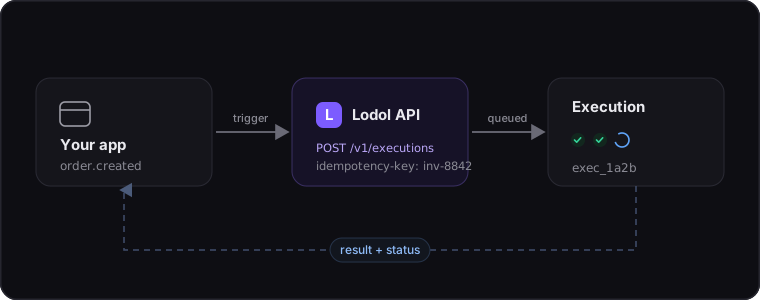
Runs are asynchronous. A workflow might finish in two seconds or take several minutes, so rather than hold a connection open, the API accepts the run and hands you an ID to follow. You start a run by its workflow ID, which stays the same when the workflow is edited, so it's safe to store.
Send a POST to the workflow's run endpoint:
curl -X POST \
  https://api-prod.lodol.com/api/v1/workflows/665f1a2b9c4d3e2f1a0b8c7d/run-async \
  -H "Authorization: Bearer sk_live_..."
The endpoint responds with 202 Accepted and the new run. Its workflow_id stays the same as the workflow is edited, while version_id names the exact version that ran:
{
  "execution_id": "6690b3d5c1e4f2a7b8d9e0f1",
  "workflow_id": "665f1a2b9c4d3e2f1a0b8c7d",
  "version_id": "6683e1c4b2a9d7f0e5c3a1b2",
  "status": "queued",
  "created_at": "2026-10-01T14:32:10.512000+00:00"
}
Starting a run needs the workflows:execute scope. A workflow that starts on a trigger, such as a new email, is armed instead: the response says running and "is_trigger_workflow": true, and it runs each time its trigger fires.
Passing inputs
Workflows can declare inputs, such as a customer name or an order number, and a run can supply them. Reading a workflow, or listing them, tells you what each one expects: every input's name, its type (text, number, true or false, list, or object), whether it's required, and its default. Pass them by name, as inputs in a JSON body:
curl -X POST \
  https://api-prod.lodol.com/api/v1/workflows/665f1a2b9c4d3e2f1a0b8c7d/run-async \
  -H "Authorization: Bearer sk_live_..." \
  -H "Content-Type: application/json" \
  -d '{"inputs": {"customer": "Acme", "order_number": "A-1042", "units": 3}}'
Values are converted to the type the workflow declares, so "3" arrives as the number 3. An input you leave out takes its default if it has one. Everything is checked before a run exists: an unknown input, a missing required one, or a value of the wrong type returns a 400 that names the problem, and nothing runs. The body is optional for a workflow that takes no inputs, and one that starts from its own trigger or schedule takes none.
Following a run
Once a run is going, you can read where it stands at any time:
curl https://api-prod.lodol.com/api/v1/executions/6690b3d5c1e4f2a7b8d9e0f1 \
  -H "Authorization: Bearer sk_live_..."
A run starts queued, moves to running, and ends success, failed or stopped, so to wait for a result, read the run every few seconds until it reaches one of those. Along the way it can be awaiting_approval, while a step waits for a person to approve it or reply, or paused, when someone has paused it in Lodol. Add ?include_step_results=true to see what each step produced. To stop a run in progress, POST to /api/v1/executions/{id}/stop.
To page through past runs, call GET /api/v1/executions. Runs come back newest first, 20 to a page by default and up to 100. Pass the ID of the last run you saw as after to get the next page, and set workflow_id to narrow the list to one workflow's runs, across every version of it.
Idempotency
Networks fail in an inconvenient way. Sometimes a request reaches the server and does its work, but the response never makes it back. Now you can't tell whether the run started. Retry and you might start it twice, and for a workflow that pays a vendor, twice is a real cost.
Attach an idempotency key to a run or stop request and retries become safe. Send the same request with the same key more than once and Lodol does the work a single time. Send one with every run your code might retry, and whenever the same run might be requested from two places, like a webhook that fires twice. The key travels in the Idempotency-Key header:
curl -X POST \
  https://api-prod.lodol.com/api/v1/workflows/665f1a2b9c4d3e2f1a0b8c7d/run-async \
  -H "Authorization: Bearer sk_live_..." \
  -H "Idempotency-Key: invoice-8842"
Lodol keeps a successful response for 24 hours. A later request with the same key gets that stored response back, with the header X-Idempotent-Replayed: true, and starts nothing new. A request that failed isn't stored, so retrying it with the same key really does try again. If the first request is still in flight when the retry lands, you get a 409 with Retry-After: 5.
A key belongs to one exact request. Reuse it within 24 hours for anything different, another workflow, different inputs, or the stop endpoint, and you get a 422 with the error_code idempotency_key_reused. Keys are scoped to your workspace, so a natural identifier from your own data, like an invoice number or an order ID, makes a good one.
Limits
Three limits apply, all per workspace.
Requests per minute. Every key in a workspace shares one limit: 5 requests a minute on Free, 50 on Builder and 200 on Pro, with custom limits on Enterprise. Adding keys doesn't raise it. Each response reports where you stand:
X-RateLimit-Limit: 50
X-RateLimit-Remaining: 48
X-RateLimit-Reset: 42
Go over and the request returns 429 with a Retry-After in seconds. This is the one limit worth a short wait and a retry.
Workflows running at once. Each plan caps how many runs can be in progress at the same time: 3 on Free, 10 on Builder, 40 on Pro. The cap covers every run in the workspace, whether it came from the API, a trigger, a schedule or a person, and a run waiting for someone's input holds its place. Start one more and you get a 429 naming your limit. It carries no Retry-After, because a place frees up when one of your runs finishes.
Runs each month. Every plan includes a number of runs a month, which reset on the 1st (UTC). Once a workspace has used them, and any extra runs it pays for, the run endpoint returns 429 with the error_code monthly_run_limit, the limit, and the time it resets. Its Retry-After counts down to the 1st, so don't treat it as a pause to wait out: surface it, or add runs from Billing, which lifts the limit on the very next request.
{
  "error": "This workspace has used all 2,500 runs its plan includes this month...",
  "error_code": "monthly_run_limit",
  "limit": 2500,
  "resets_at": "2026-11-01T00:00:00+00:00"
}
Errors
Errors use standard HTTP status codes with a JSON body. The body always carries an error message, and some responses add a stable error_code you can branch on: monthly_run_limit, concurrency_limit or idempotency_key_reused.
| Status | Meaning |
|---|---|
400 | The request can't be run as sent: a bad input or body, a workflow that hasn't been published, a run that has already finished, or a bad cursor, limit or parameter |
401 | The API key is missing, malformed, revoked or expired |
403 | The key is missing a scope the route requires |
404 | No workflow or run with that ID exists in your workspace |
409 | A request with the same idempotency key is still being processed |
422 | The idempotency key was already used for a different request |
429 | The request rate, the running-at-once cap, or the month's runs were reached |
Getting started.
Create a key on the API Keys page in your workspace, and you can list workflows and start runs from your own systems in a few minutes, with nothing to install. The complete reference, with every endpoint, field and parameter, is at docs.lodol.com.


