
Every automation platform makes a promise the first time you press Run: that the thing you designed is the thing that will happen. Keeping that promise on the hundred-thousandth run, on a day when an outside service is slow and the server running your workflow is replaced halfway through, turns out to be most of the actual engineering. This is a look at how we built Lodol's execution engine to keep it.
The guiding idea is short enough to fit on a sticky note. The engine should never guess. Almost everything below is a consequence of taking that seriously.
A model runs only where you put one
The most consequential decision we made is that no model decides, while a workflow runs, what it does next. Every workflow is saved as an explicit program of steps, decisions, loops and conditions, and each run follows a frozen copy of it, exactly as it stood when the run began. Nothing reinterprets your intent from one run to the next, so the order of steps can't drift, and Lodol's own steps and comparisons give the same answer every time they're given the same values. This is the difference between a recipe and a conversation. A conversation can wander somewhere new every time you have it. A recipe, followed exactly, lands in the same place. We wanted the engine to be a recipe.
Some decisions don't fit a rule, and for those you can put a model exactly where you want one, and nowhere else. A condition written in plain words, like "this email is from a sales lead", asks a model one yes-or-no question, and the thresholds you set send the run down the Yes or No column you drew, or a Not sure column if you've added one. An AI agent step chooses among the tools you allowed it, but only inside that one step. Either way, the model can't add, skip or reorder anything around it. And if it can't answer, the step fails rather than guessing, so a Try / Catch can send the run somewhere safe.
Runs live on our servers, not in your browser
Early on, workflows ran in the browser. It was simple, it demoed fine, and it was quietly fragile, because closing the tab took the run down with it. So we moved execution to our servers, and that one change made most of what follows possible. A workflow's fate stopped depending on someone's laptop, network or attention span. It can run on a schedule at 3am, start when an email arrives, and carry on after you close the tab. And it can survive the machines underneath it changing, which is the part that turns out to matter most.
When a server goes away mid-run
Here is a scenario every serious execution engine has to answer for. A workflow is twelve steps into a twenty-step run. It has already charged a card and posted a ledger entry. Then the server it's running on is replaced, as servers routinely are during an update or a busy afternoon.
Both of the easy answers are unacceptable. Restart from the top and you charge the card twice. Drop the run and you've left the books half-written. Neither is a sentence you want to say to a finance team.
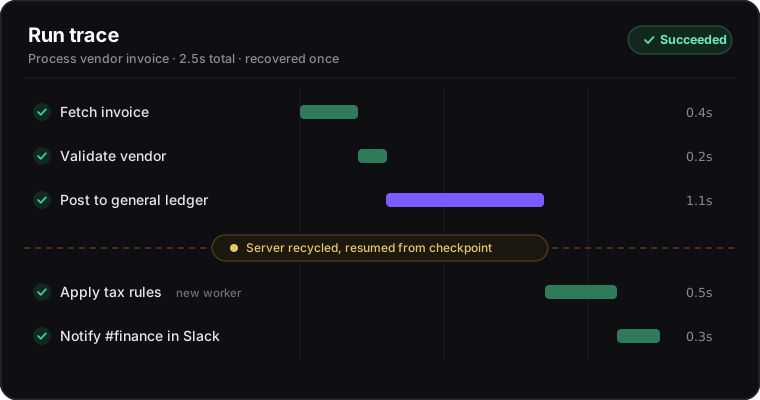
So after every step finishes, Lodol saves where the run is and everything it knows so far, with any secrets left out. If the server running it goes away, the run isn't lost and doesn't start over: Lodol picks it up on another server, after the last step it finished. Steps that already finished never run again, a decision that was already made stays made, and a run that was paused comes back paused. The one step that can run a second time is the one that was in progress at the moment the server went away, because there's no knowing how far it got. Our bar is simple to state: losing a server mid-run should cost a delay, never finished work and never a fresh start.
Triggers that hold up while servers come and go
A workflow that runs when you click a button is easy. A workflow that reliably starts when a new email lands, while servers are being added and removed underneath it, is where the interesting failure modes live: the email noticed twice, or noticed by a server that's about to disappear.
So exactly one server at a time is responsible for each workflow's triggers, and if it goes away, another takes over on its own. That's what keeps a busy afternoon from turning one new email into two runs. Triggers that watch an app check for new events every minute on paid plans and every 15 minutes on Free, and when you don't want to wait, Poll Now on the run page checks straight away. The outcome we're after is boring on purpose: one event, one run.
Make the run legible
None of this is worth much if you can't see what the engine did, so the record of a run isn't a layer we bolted on afterward. It's part of how the engine works: every step reports when it started, how long it took, what it returned and any error, as it happens.
Open a run and Steps Ran lists exactly the steps that ran, in order: which way each decision went, every pass through a loop, what each step was given, with the actual values filled in, and what it handed back. When a judgment call made a decision, the run shows the answer and how likely the model thought it was.
Errors are written in plain words, so dividing by zero says there's no result instead of showing a stack trace. A run that was interrupted and resumed is still one run, with one list of the steps it ran. And when a run fails, an email tells you so, by default, rather than leaving it to be noticed.
Why boring is the goal
None of this is flashy. There's no demo where "the run picked up where it left off after its server was replaced" gets applause, and that's rather the point. If you're handing an automation your invoices, your payouts or your month-end close, you don't need it to be exciting. You need it to be there, to be correct, and to explain itself, on the worst day as reliably as the best one. An engine that never guesses is how you get there. A saved place after every step, a frozen copy of every workflow, one owner for every trigger, a record of every run: all of it is just what it takes to keep one plain promise at scale.
Curious how a run holds up under real conditions?
Talk with our team, and we'll walk you through what happens to a run on a bad day, step by step.


