
There's a myth that automation is a solo activity. One clever person wires up a workflow, and it quietly runs forever. Anyone who has actually lived with production automations knows better. The workflow that pays vendors gets touched by finance, by ops, and by whoever happens to be on call the night it breaks. It outlives the person who first built it. It changes hands, changes requirements, and changes shape. Automation is a team sport, and for a long time the tools didn't act like one.
A lot of our recent work has gone into closing that gap. The thread running through it is a single belief: a workflow is not a personal script, it's shared infrastructure, and it should be built and maintained the way teams build everything else that matters.
Version history, so "who changed this, and why" has an answer
The scariest sentence in automation is "it worked yesterday." When a workflow that touches real money starts behaving differently, the first question is always the same: what changed?
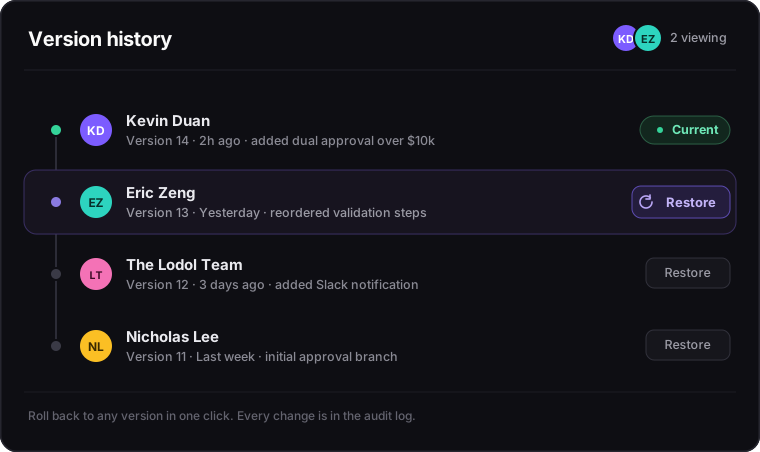
Now you can answer it. Lodol keeps a version history for every workflow, with who saved each version and when. Open any version to see exactly how it differs from the one running now, and, the part that actually lets people sleep, roll back to it in one click. A bad edit stops being a crisis and becomes an undo. That safety net quietly changes how a team behaves. People are willing to sharpen a workflow when reverting is instant and free, and they get cautious and slow when it isn't.
Real-time presence, so two people don't edit blind
Google Docs solved a problem word processors didn't know they had: you should never overwrite a colleague because you couldn't see them typing. Workflow builders had the same blind spot, with higher stakes.
Lodol now shows presence in the editor. You can see which teammates are viewing a workflow right now, so the classic disaster, two people editing the same automation, each unaware of the other, one silently clobbering the other's work, just doesn't happen. Coordination stops being a Slack message that opens with "hey are you in the AP workflow right now?"
Comments where the work actually is
Feedback on a workflow used to live somewhere the workflow didn't. A thread, a ticket, a meeting. By the time you were making the change, the context was three tabs away.
So we brought the conversation onto the workflow itself. Leave a comment beside the step it's about, mention the teammate who needs to see it, and reply in the same thread. The comment stays on the canvas, right where you put it, until someone resolves it, so the conversation about "this approval threshold" sits next to that approval threshold, not in a message three tabs away. The review happens where the work is, which is the only place it has ever really belonged.
Roles and permissions, because not everyone should change everything
Shared infrastructure needs boundaries. On a team of any size, the person who reviews a workflow, the person allowed to change it, and the person who can run it are often three different people, and the tool should respect that instead of flattening everyone into "can edit."
Every person in a workspace is an owner, an admin or a member, and running a workflow, editing it and managing the workspace are separate permissions. Every run is logged with who started it. On Pro, custom roles let you group permissions to match how your team actually works, and an activity audit log records who did what and when, ready to export. That's the thing careful and regulated teams actually need: not just automation, but automation with accountability. Who changed this, and who ran it, becomes a question with a real answer rather than a shrug.
Your AI is on the team too
Now that you can build workflows by asking Claude or ChatGPT, connected to Lodol, instead of by hand, it matters that the same rules apply to your AI as to everyone else. It can only do what your own role in the workspace allows, its changes go into the same version history, so you can compare them and roll them back, and its workflows show up in the same place, with the same run history, as everything your team built. A teammate who works fast still has to leave a paper trail.
The through-line
Step back and a pattern shows up. Version history is an undo button for the whole team. Presence is the awareness you get in a shared document. Pinned comments put the review where the work is. Roles are accountability. None of these ideas is new to software teams. What's new is bringing them to automation, which for too long got treated as a place where one person quietly did something clever and hoped nobody would ever have to touch it again.
Someone is going to touch it again. More people, for longer, than whoever built it first. Building it should feel less like editing a fragile personal macro and more like collaborating on something the whole team owns, because that is what it is.
Building automations with more than one person?
Every Lodol plan has unlimited seats, so bring the whole team, reviewers and approvers included. Start free, or compare plans to see what Pro adds.


